Case three · J.P. Morgan · Securities Services · 2022 to 2023

Deal Model

Four teams with four ideas of what a deal is. Custody ops, sales, legal and product priced global custody deals from one large spreadsheet and email chains. Slow, easy to get wrong, and no audit trail. I was embedded with the four teams for a year. One web platform, one deal object, four views.

Role · UI leadTeam · Two UX designers, a junior designer, a BA, a researcher, a data analyst, engineersStatus · In use internally. Six design phasesPlatform · Web, desktopMy involvement · Before Fusion; I moved to Fusion in 2023
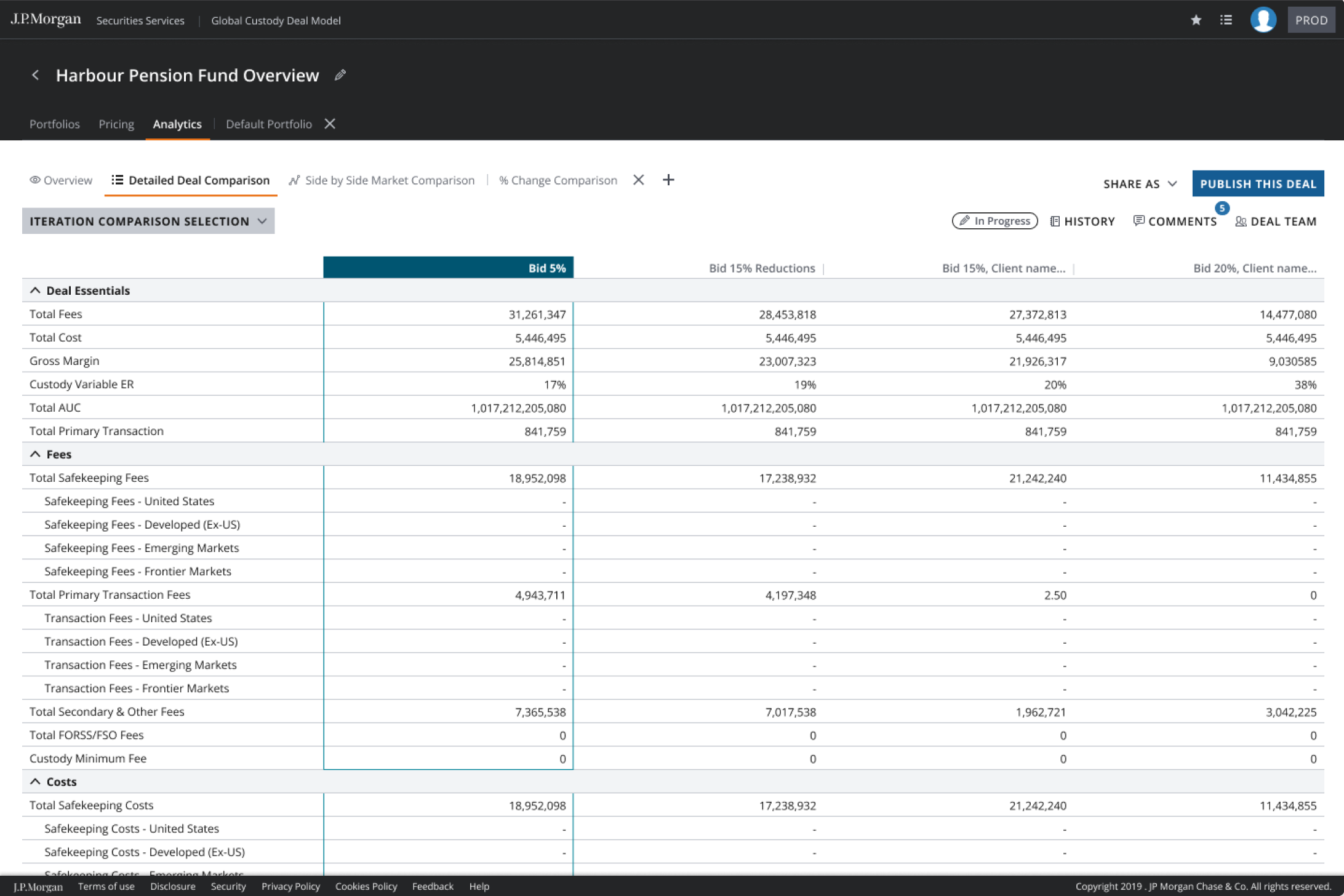
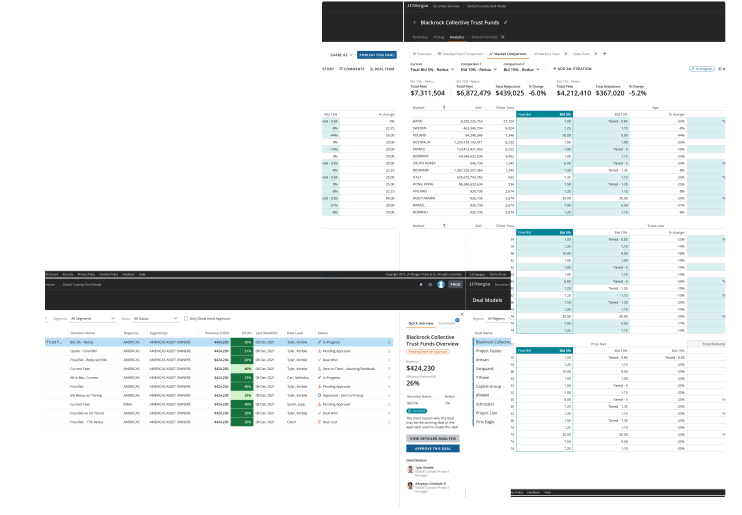
Original Deal Model composition with overlapping market pricing comparison and deal approval overview screens

01 Problem

  • Users

    Custody ops, sales, legal and product. Each team priced and approved global custody deals from its own copy of one large spreadsheet, with email as the audit trail.

  • The job

    Price a deal, compare iterations, get it approved and signed off, with a record that survives an audit.

  • Where it started

    About sixty product owners on one Excel app. Creating a deal took around two hours across tools. Slow, easy to get wrong, and no audit trail. The two-hour figure is my estimate from sitting with the teams, not a measured study.

  • Business goal

    Move deal pricing onto one web platform so the four teams work from one object, and the sign-off trail comes out of the tool instead of someone's inbox.

02 Users and research

  • How I got in the room

    In a bank there is usually a BA between the designer and the user. I was embedded with the four teams for a year. Weekly with each one, and a shared review every fortnight where all four saw the same screen. Short sessions on their own deals, not a demo. Watching someone price a real deal tells you more in twenty minutes than a workshop does in a day.

  • Three versions, every review

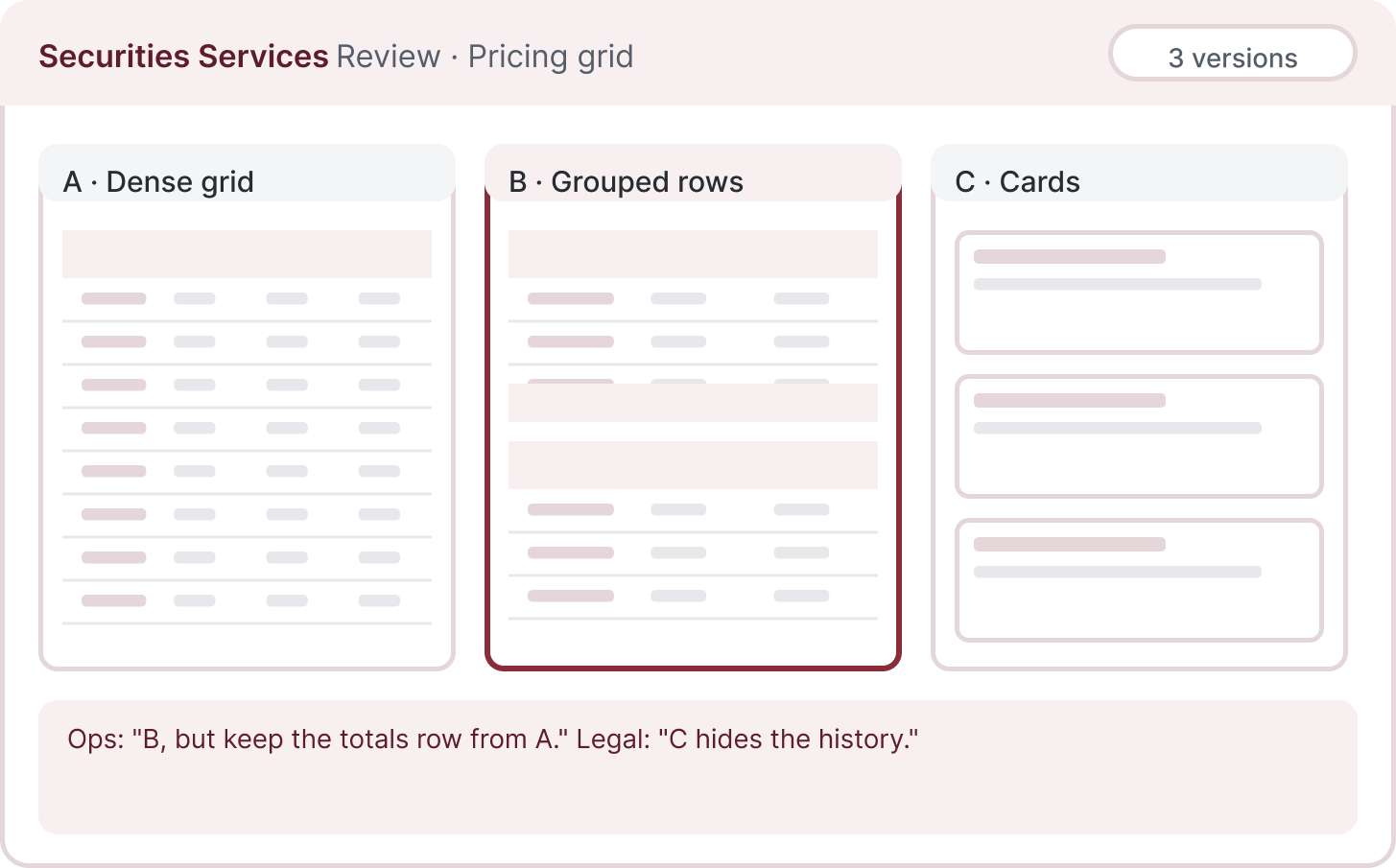
    I never showed one proposal. The one I thought they'd want, and two that did it differently. People are much better at saying what's wrong than what they want, and the answer was usually a merge. Sales got the comparison table out of that. Legal got the iteration list. Nobody got the whole thing their way, which is why all four used it.

  • Who I worked with

    Two UX designers on flows and research, a junior designer on screens with me, a business analyst, a researcher, a data analyst, and the engineers in every review.

User personas

Four composite roles from the four teams I sat with for a year: the deal owner who prices, the ops lead who approves, legal who checks the terms, and the product owner who keeps the portfolio.

The deal owner

Custody sales Prices and defends the deal

Show me the three iterations side by side and tell me which one wins.

Context

Builds and prices a custody deal, compares iterations and explains the proposal sent for approval.

In this app
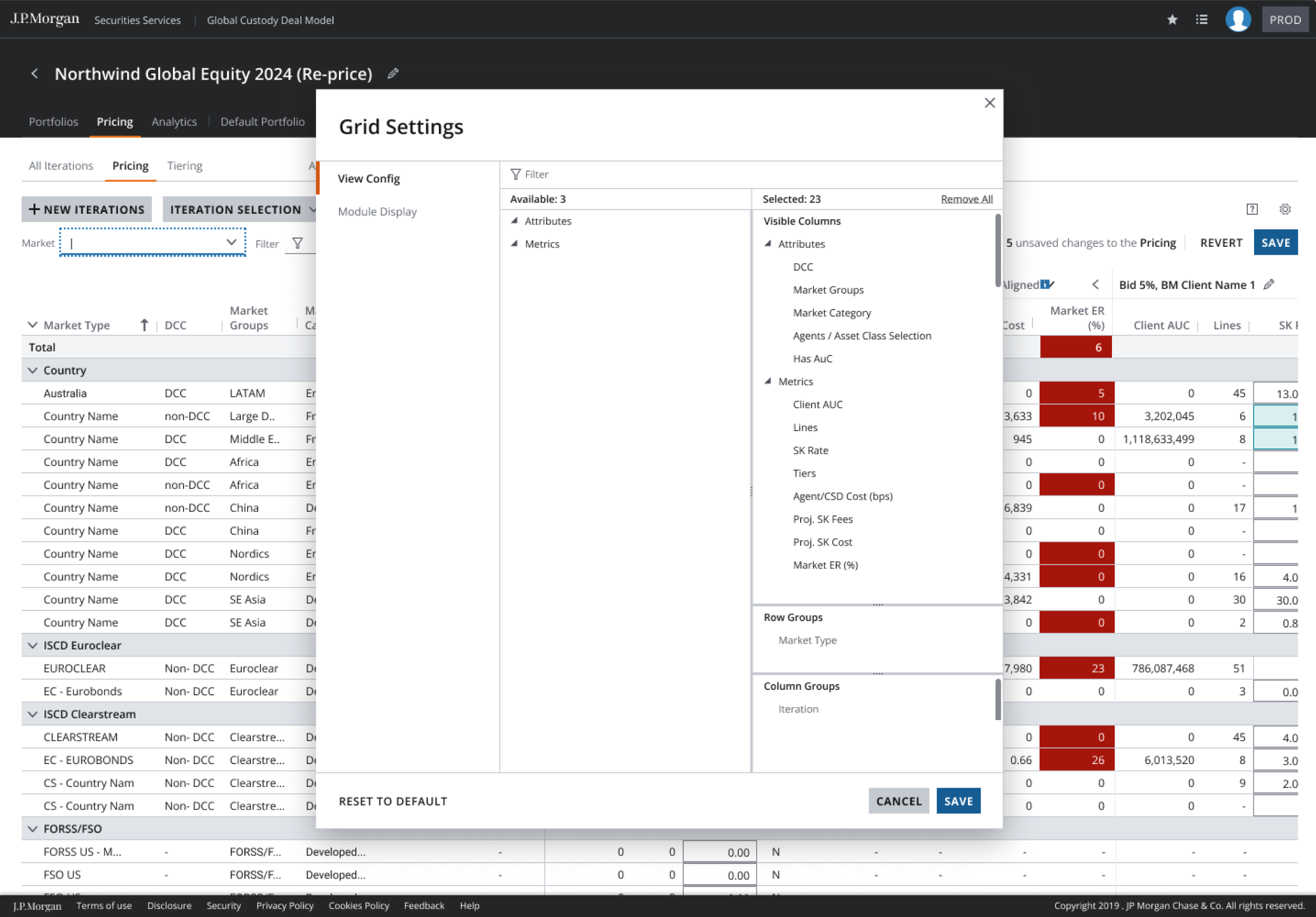
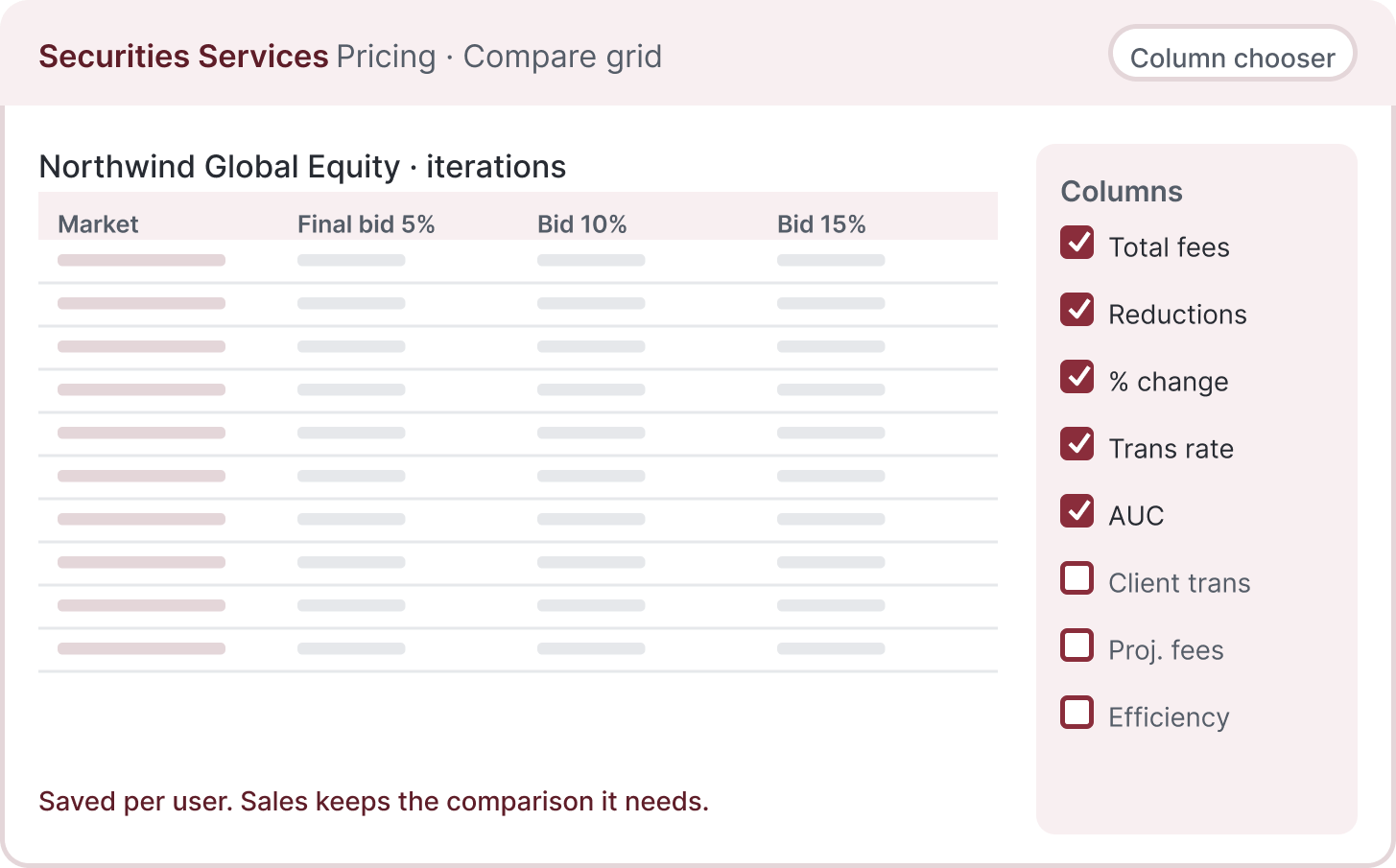
  • Compare grid with a column chooser
  • Quick overview per deal
  • Status and deal lead on the landing page
Goals
  • Price a deal in one sitting
  • Compare iterations without rebuilding the sheet
  • Know where approval is stuck
Pain points
  • Four copies of the same spreadsheet
  • Numbers that disagree by team
  • Approval chased over email

The approver

Custody ops lead Signs the deal off

I need to see what changed since the last version, not the whole deal again.

Context

Reviews the proposed deal, its financial comparison and the owner’s reason before signing off.

In this app
  • Iteration list with what changed
  • Comparison and comments alongside the chosen iteration
  • Owner-written winning-bid reason before publishing
Goals
  • Approve with confidence
  • See the iteration history
  • Hand a clean record to audit
Pain points
  • No audit trail outside an inbox
  • Reviewing the full sheet for one change
  • Pricing differences that need explanation

The legal reviewer

Legal Reviews terms and the deal record

Which rate card is this on, and who changed it?

Context

Reviews the terms and supporting deal record alongside the other teams.

In this app
  • Benchmark rate cards in the flow
  • Pricing warnings and the iteration history
  • History per iteration
Goals
  • Trace every rate to a card and a person
  • Understand the terms behind the selected price
  • Keep the terms consistent across deals
Pain points
  • Rate cards living in attachments
  • No link between a price and its source
  • Changes with no name on them

The product owner

Product Owns the portfolio and the platform

I need one version we can review together.

Context

Owns the portfolio and platform, balancing the needs of sales, operations and legal.

In this app
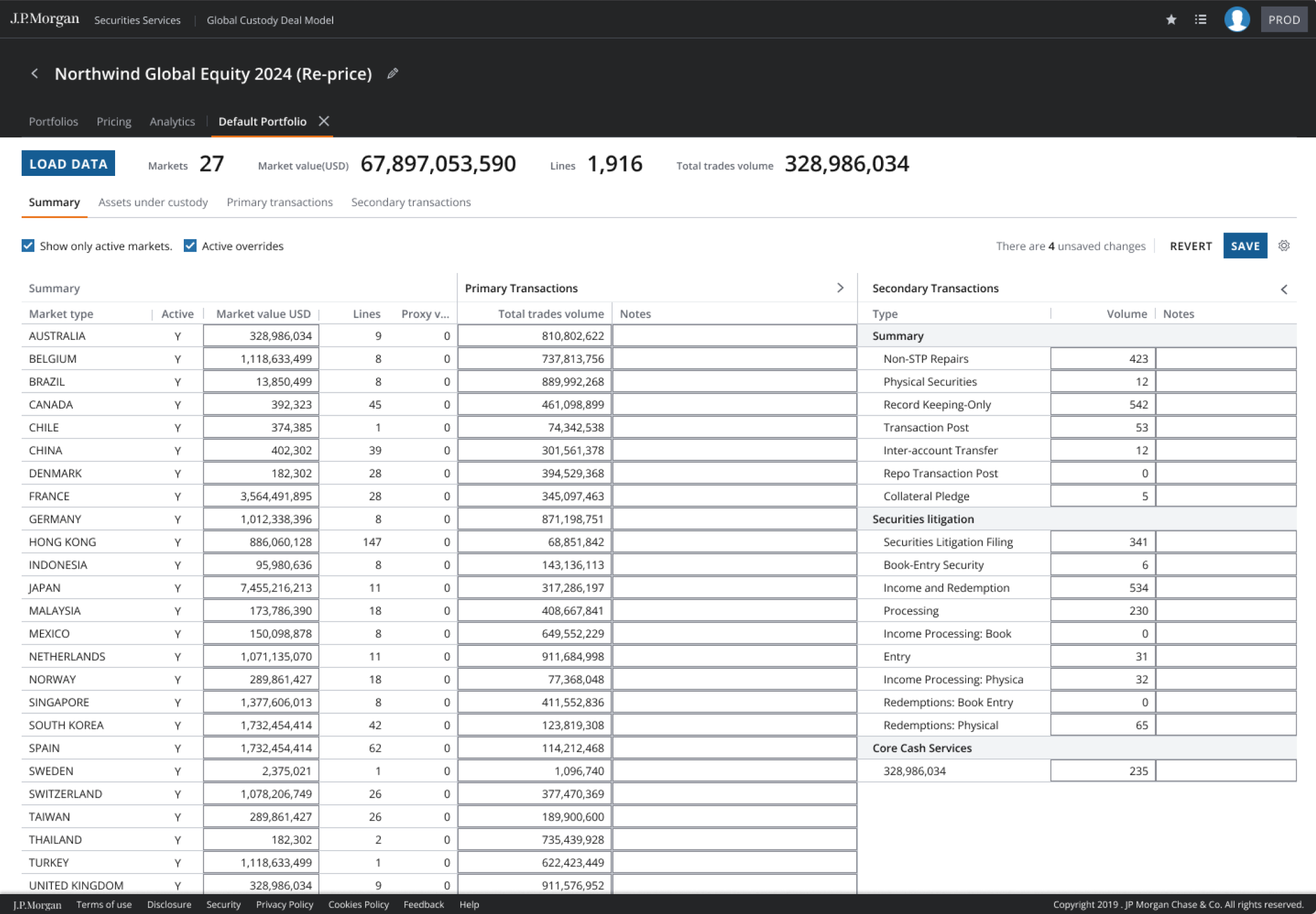
  • Portfolio summary and load-data flow
  • Upload template the system maps
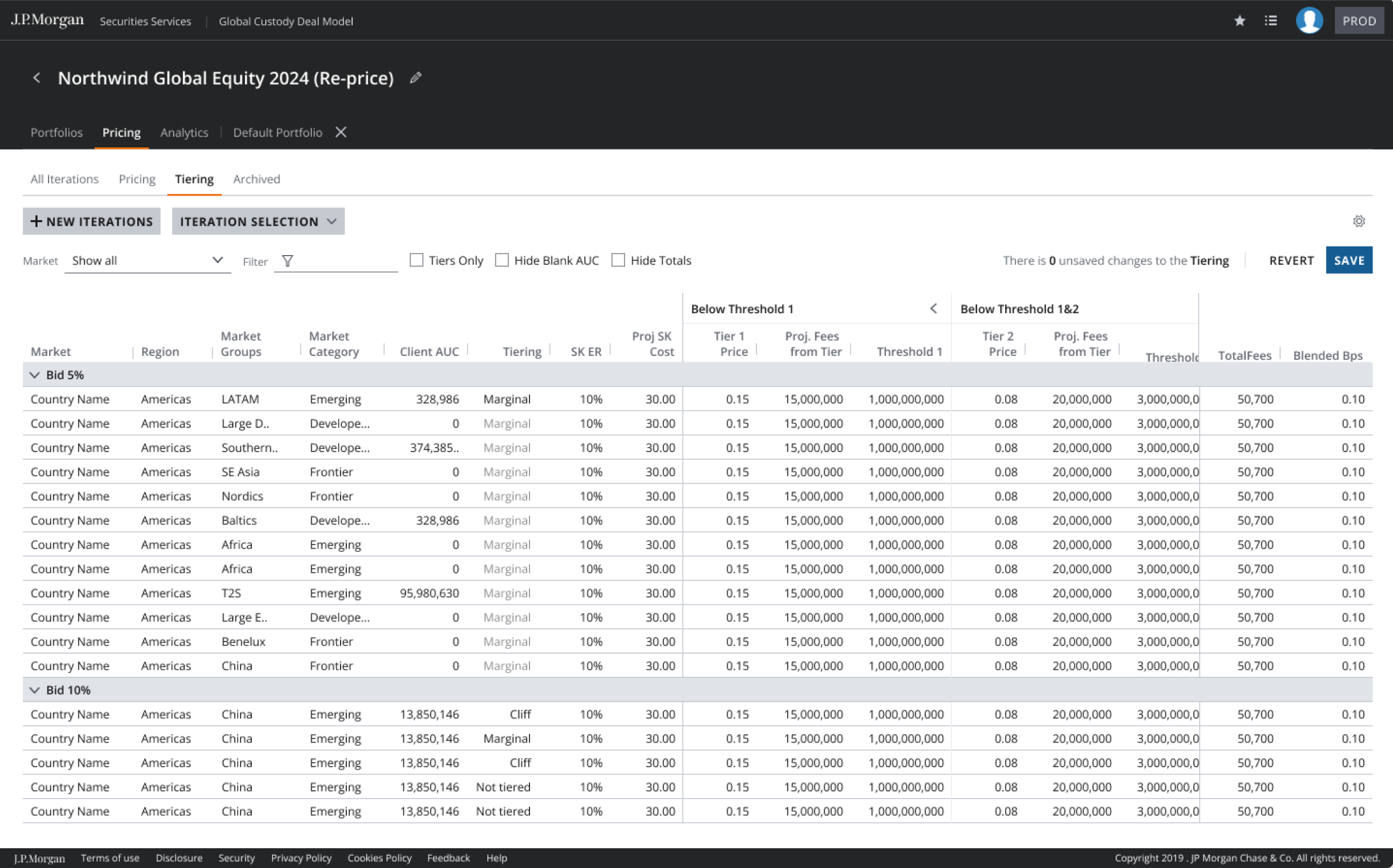
  • Tiering across AUC and transactions
Goals
  • One place for the portfolio
  • Load data without hand-keying
  • Keep the people who love Excel
Pain points
  • Separate copies of the same pricing work
  • Hand-keyed portfolios
  • Migration that loses people

Composite roles drawn from a year with the four teams. Not research participants, and no individual is depicted.

03 Constraints and role

One deal, four views, a bridge from Excel

  • A shared object, role-specific views

    Sales, legal, custody operations and product had different definitions of a deal. Each needed its own view of the same object.

  • Keep the familiar starting point

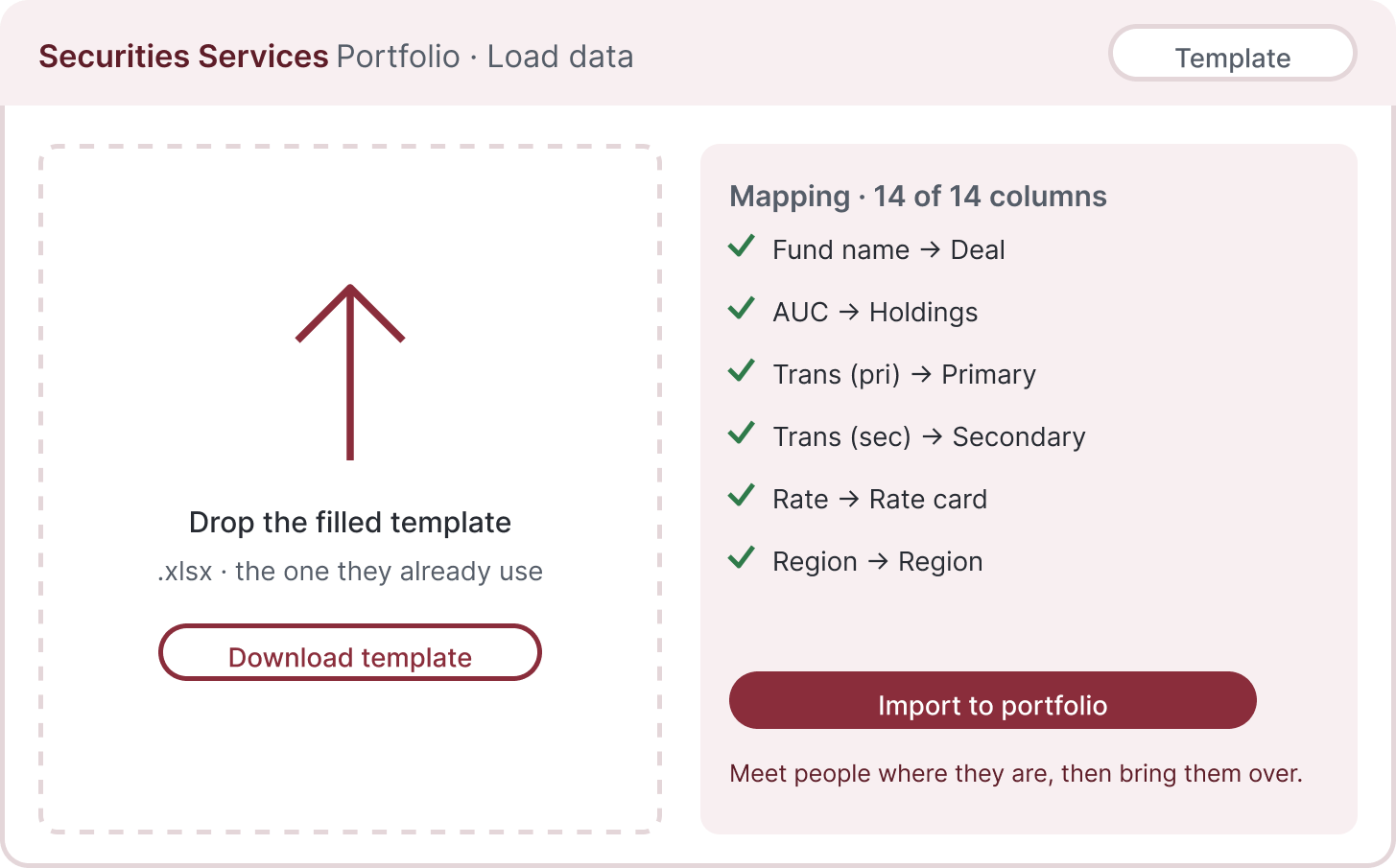
    People kept Excel because they did not yet trust the platform or recognise its layout. Download the template, fill it in as usual, then upload it. The system maps it into the deal.

  • A record built as people work

    Every price needs a source, every change a person, and every deal a sign-off trail. Checks run as people work; the record comes from the tool.

I asked what each team needed to see and change, rather than asking them to agree on one design.

  • Accessibility

    ADA specs sat inside the design file: landmarks, tabbing order, content hierarchy and alt text for every screen, reviewed with the ADA specialist before engineering picked it up.

  • What was mine

    I led UI: the compare grid, the column chooser, the iteration list, the validation states and the three-versions review format. The five-step flow was shared with the two UX designers. The upload-template idea came from a user session. I worked it through with the BA.

  • Six phases

    Phases one to six, before I moved to Fusion in 2023. Deals, portfolio, pricing, tiering, ADA specs, smart pricing, then the deal-owner dashboard and the approver workflow.

04 Workflow

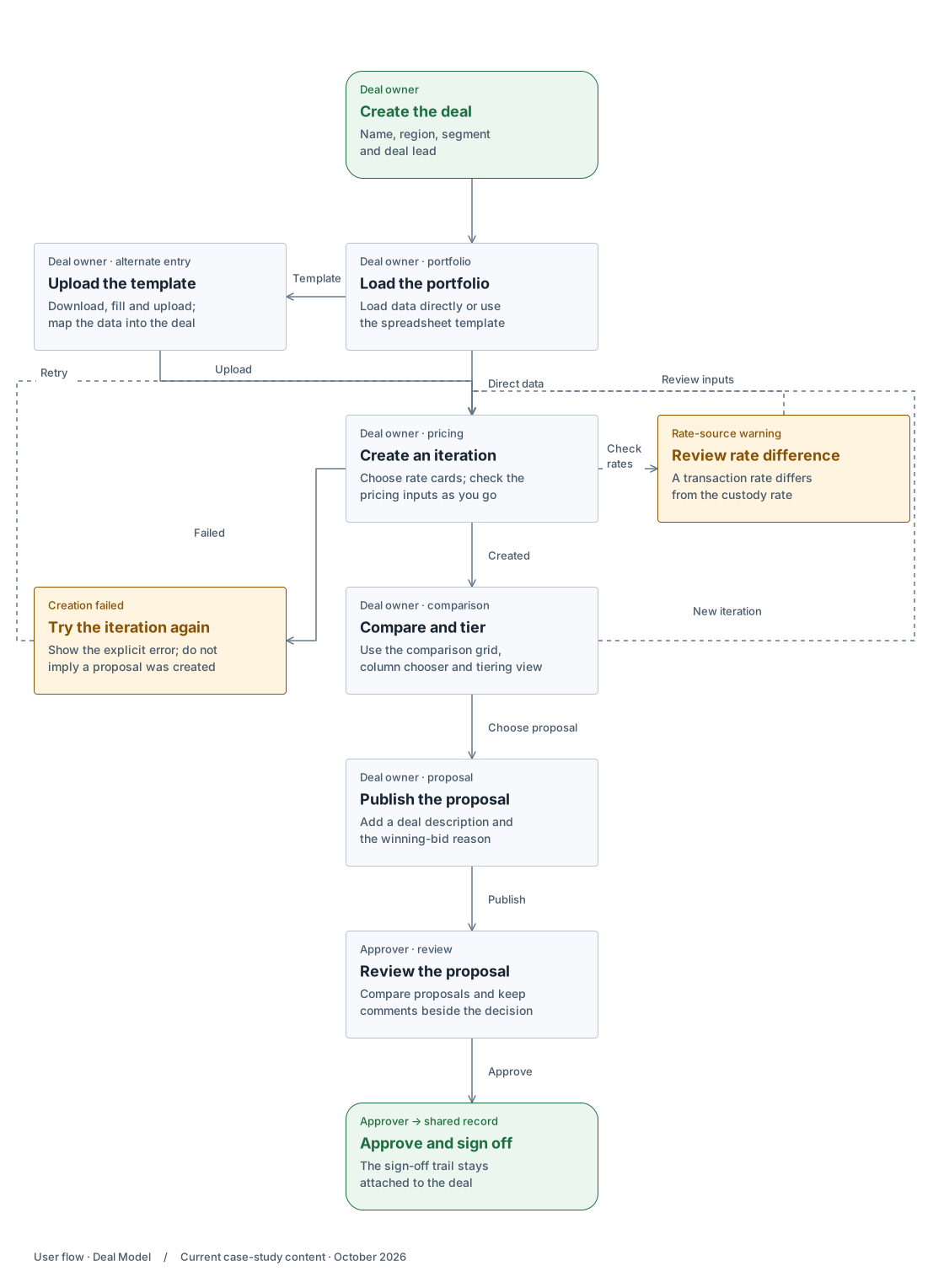
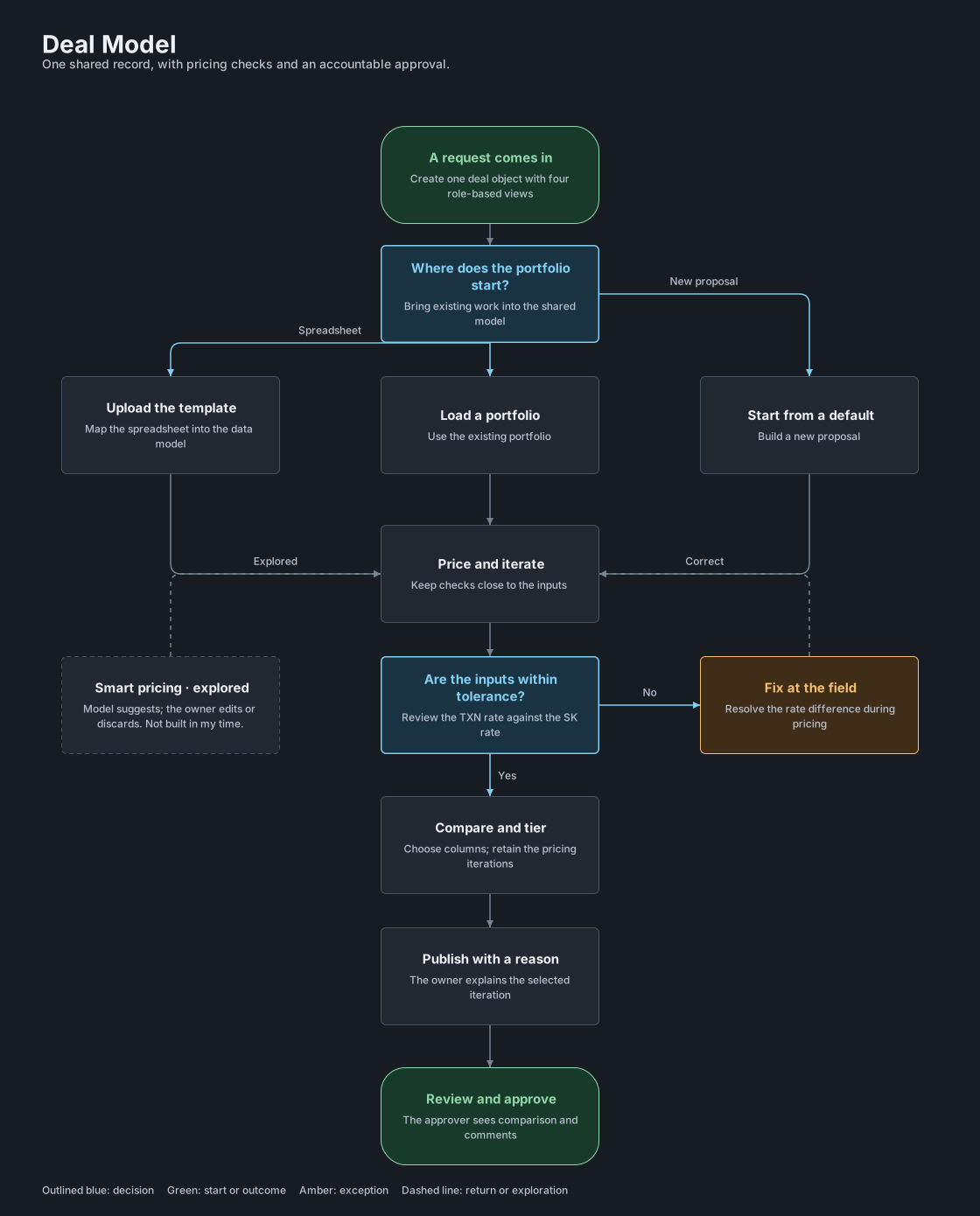
Create the deal. Load the portfolio. Price and iterate. Compare and tier. Approve and sign off. Each step shows only what you need at that stage, with checks as you go. The owner publishes a proposal with a description; the approver reviews the comparison and comments.

User flow

The deal owner prices and compares proposals before handing one to the approver.

Internal design workflow · one deal object shared by sales, custody operations, legal and product.

On smaller screens, enlarge the flow to read and explore the branches.

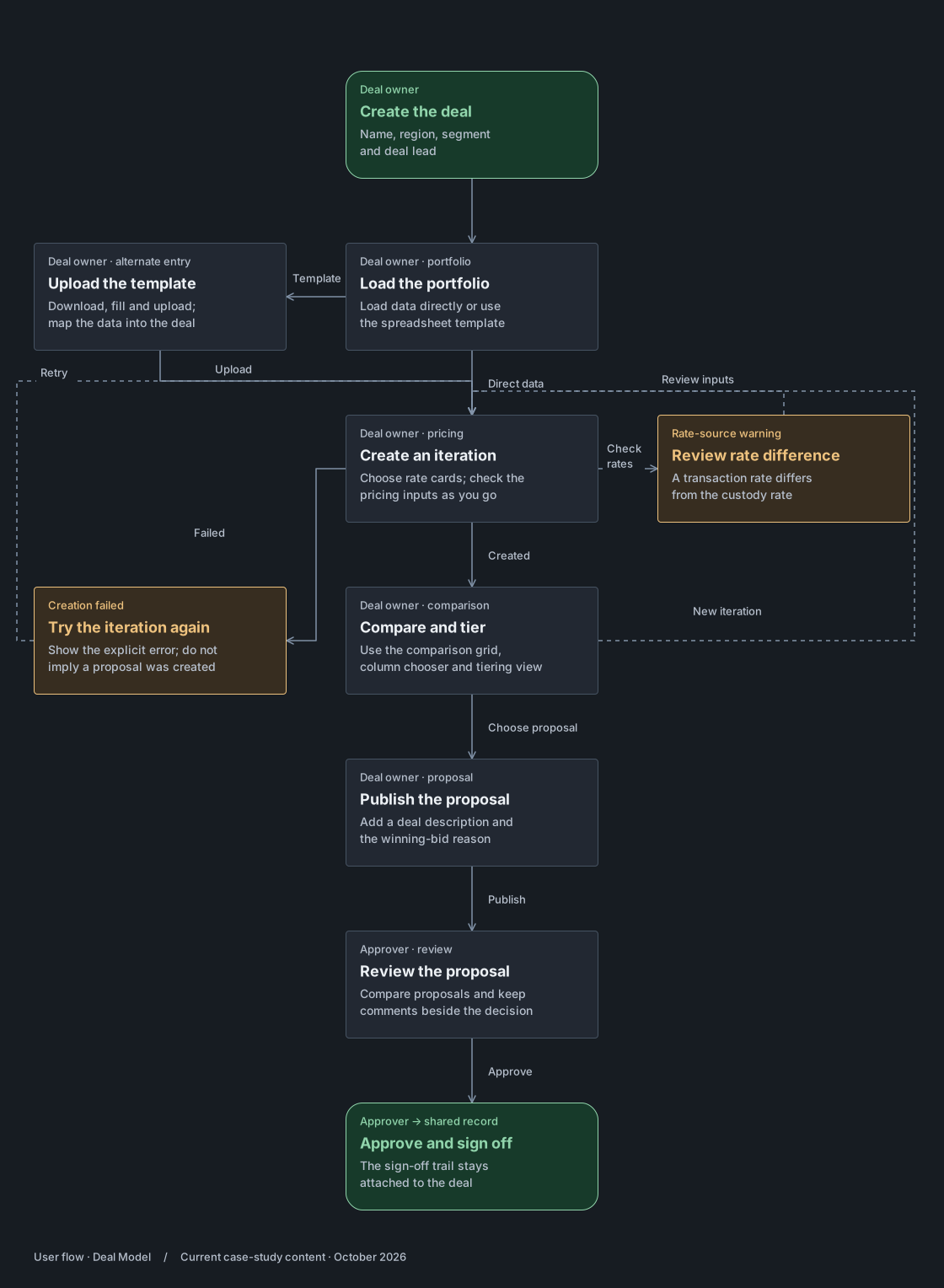
Deal Model · from setup to approval. The deal owner prices and compares proposals before handing one to the approver.Deal Model · from setup to approval. The deal owner prices and compares proposals before handing one to the approver.

User journey

The deal owner · Custody sales · London · Global custody deal, four teams, one platform

Persona

The deal owner

Custody sales Prices and defends the deal

Scenario

A client asks for a reprice before a call. The deal owner opens the deal, loads the portfolio, builds a new iteration on the benchmark rate card, compares it with the last two, and sends it for approval.

Goal

Price the deal, explain the selected iteration, and get a recorded approval with the comparison and comments in view.

One deal, shared across the teams

Sales, custody operations, legal and product work from the same deal. Each iteration carries the pricing decision forward.

01Create the deal

The deal owner creates the deal: name, region, segment, lead. Before, every team set a deal up its own way.

Design response
  • One deal object, four views
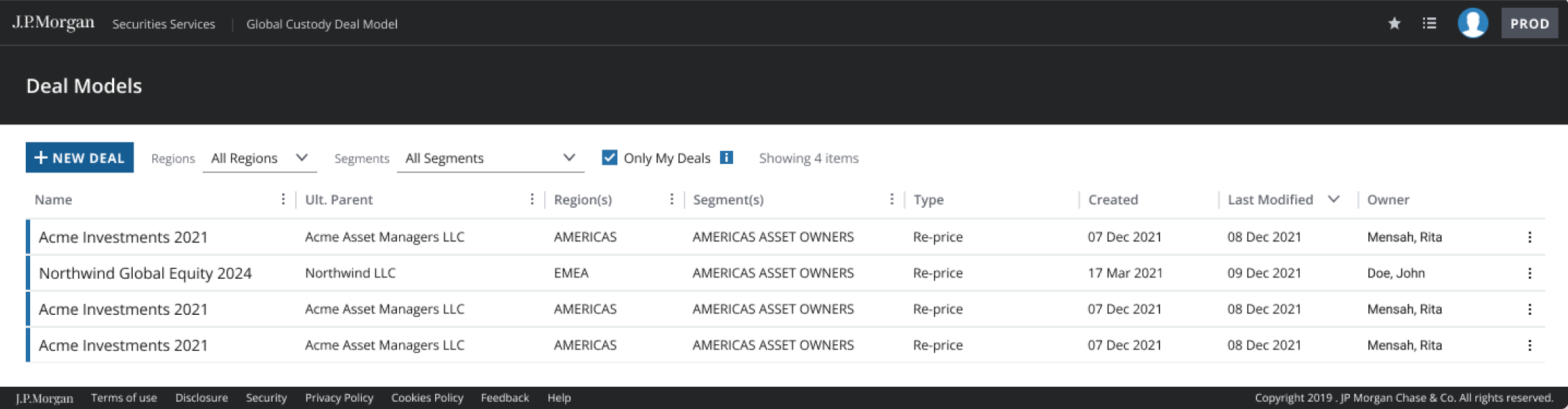
  • Status and deal lead on the landing page
What the system does

Deal object created with role-based views. Deal team and status stored once.

02Load the portfolio

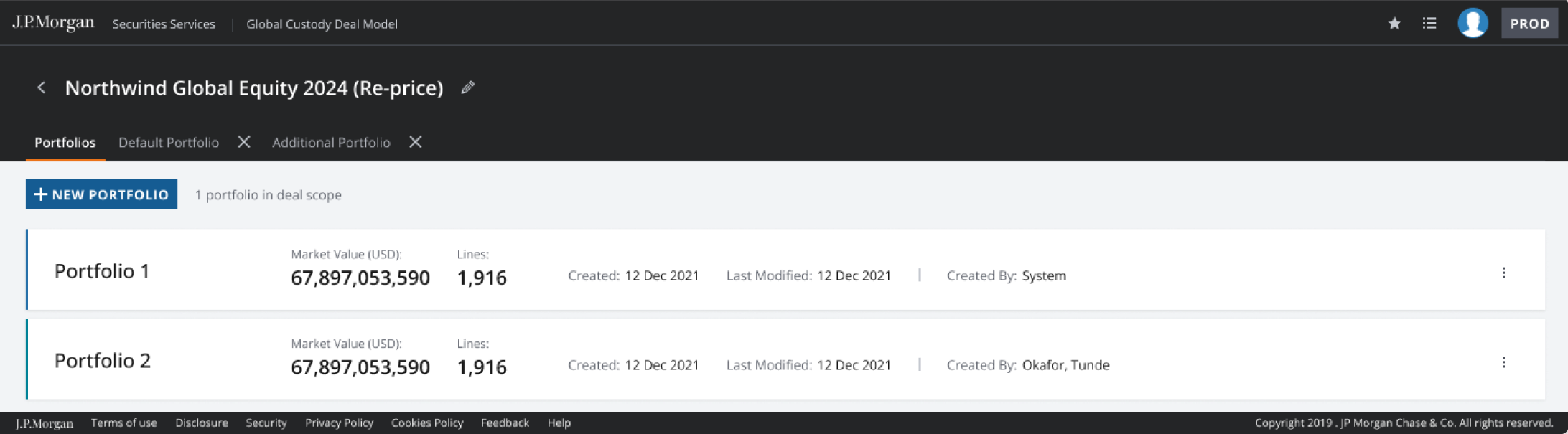
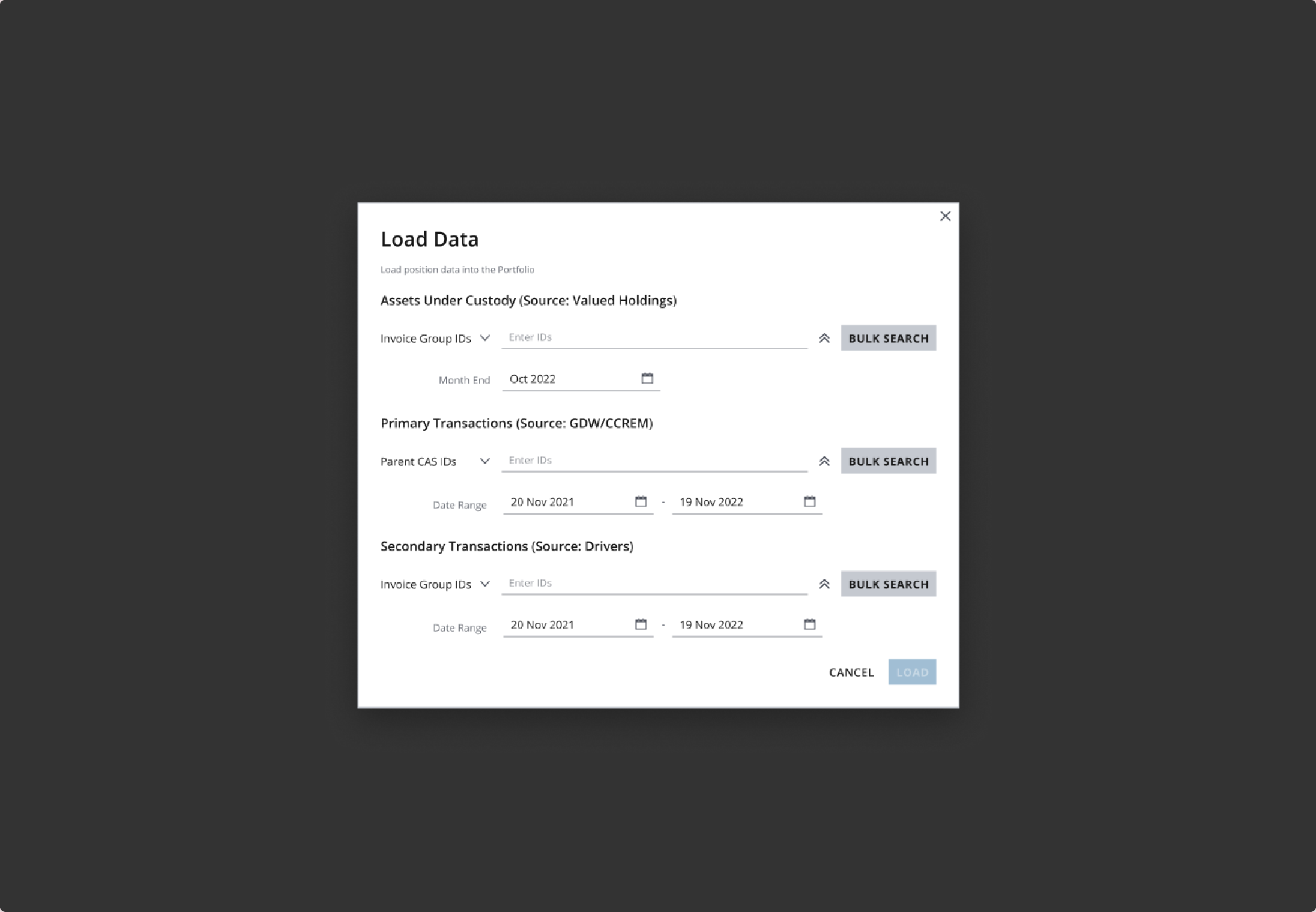
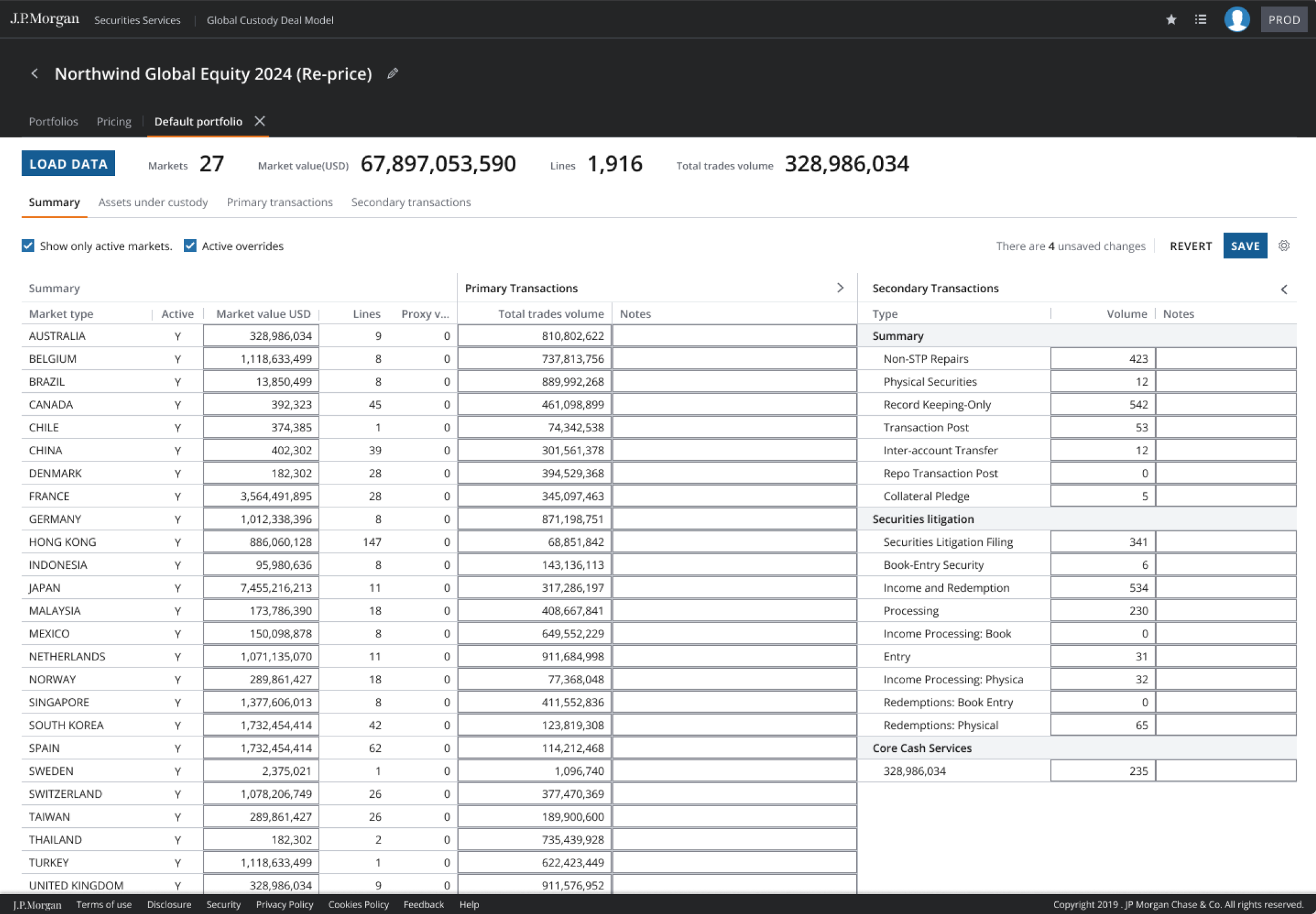
Loads holdings and transactions, or uploads the filled template the system maps. Before, hand-keyed from a spreadsheet.

Design response
  • Load-data flow
  • Upload template, mapped by the system
What the system does

Mapping translates the uploaded template into the deal data model.

03Price and iterate

Builds iterations from rate cards. The original design warns when the transaction rate differs from the SK rate, so the owner can review that difference.

Design response
  • Review the rate difference
  • Confirm which iterations were created
What the system does

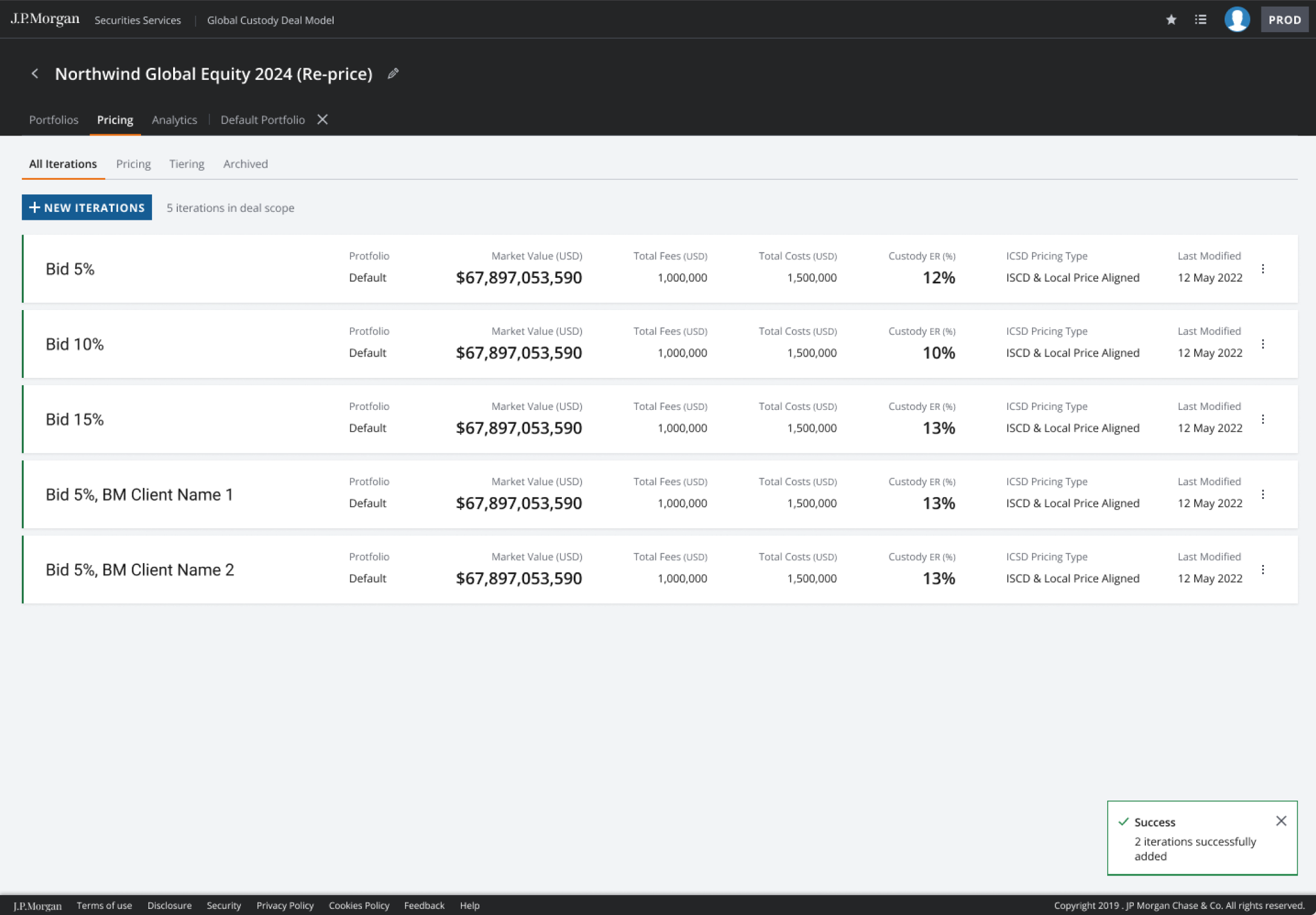
Iteration creation reports success or failure. The pricing design includes a warning when TXN rate differs from SK rate.

Rate difference → review the TXN rate against the SK rate.

04Compare and tier

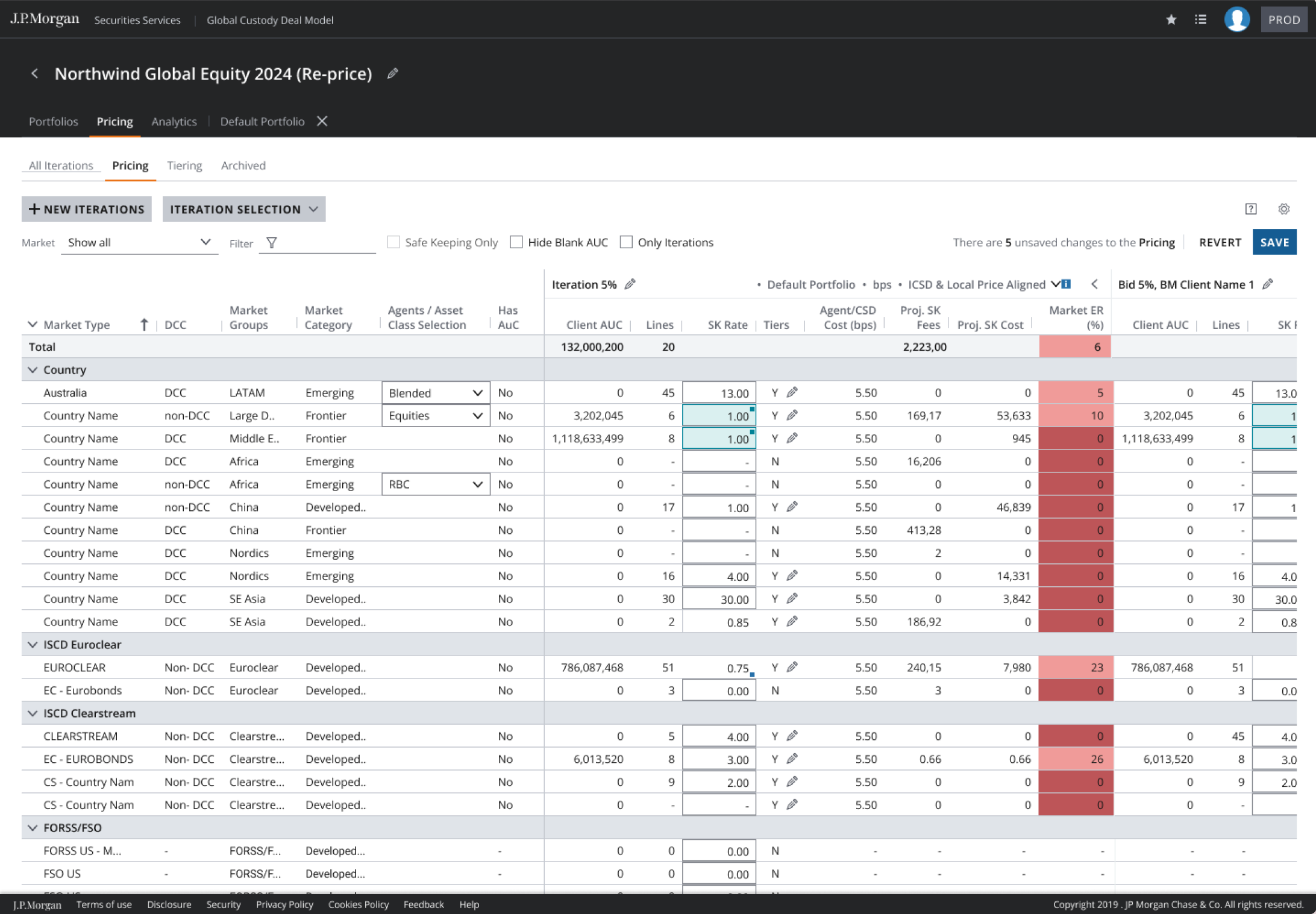
Puts iterations side by side in the compare grid, chooses columns, applies tiering across AUC and transactions.

Design response
  • Compare grid with a column chooser
  • Tiering grid, saved per user
What the system does

Grid settings saved per user. Tiering rules by AUC band and transaction type.

05Approve and sign off

The deal owner adds a description and publishes the proposal. The approver compares proposals and approves the deal with comments.

Design response
  • Owner-authored deal description
  • Proposal comparison and comment thread
What the system does

Separate deal-owner and approver views keep the proposal and approval discussion attached to the deal.

Opportunities

Keep pricing warnings close to the work. Make comparison a view, not a rebuild. Keep the owner’s reason with the iteration the approver reviews.

Product screens

Original screens from the Deal Model stakeholder design file, phases one to six. These are design artefacts, not live production captures.

05 Decisions and trade-offs

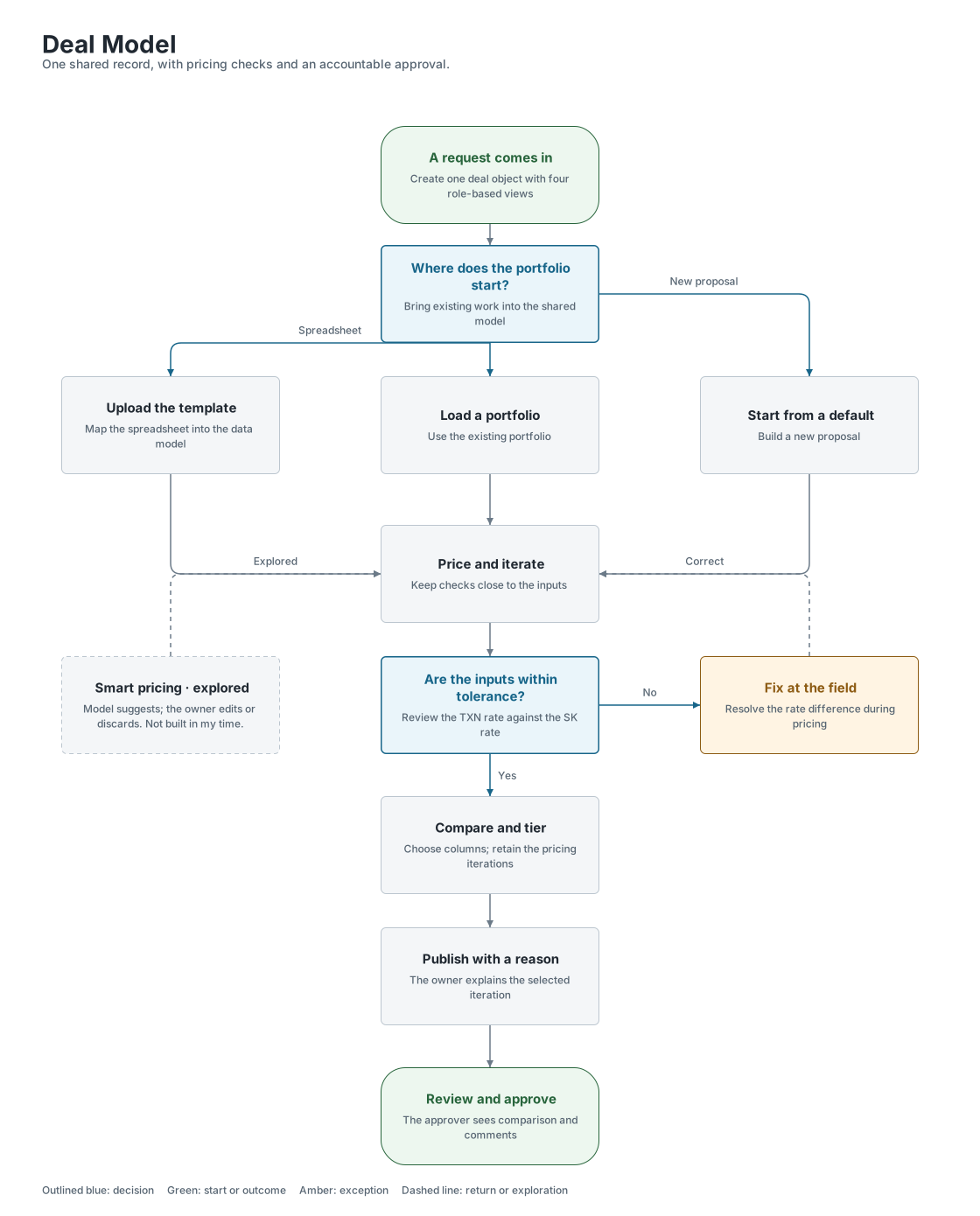
Decision map

A shared deal record is the foundation. Reviews shape it, comparison makes pricing usable, the upload route supports migration, and approval keeps the owner’s reasoning with the selected iteration.

On smaller screens, enlarge the map to read and explore the branches.

Deal Model decision map. One shared record, with pricing checks and an accountable approval.Deal Model decision map. One shared record, with pricing checks and an accountable approval.

Agree the object before the view

The four teams share a deal, while their columns and responsibilities differ. Multiple proposals in review helped expose those differences.

Price, then make the decision reviewable

The compare grid and upload route help the owner prepare the deal. Publishing an iteration carries the owner’s reason and comments into approval.

Keep exploration separate from delivery

Smart pricing was explored with the data analyst. It is not evidence of a deployed recommendation model.

  1. Shared internal product design

    01One object, four views

    What is shared when four teams mean different things by a deal?

    Separate spreadsheets and email chains left each team with its own view of pricing and status. Agreement was needed on the record underneath, not identical screens for every role.

    I chose

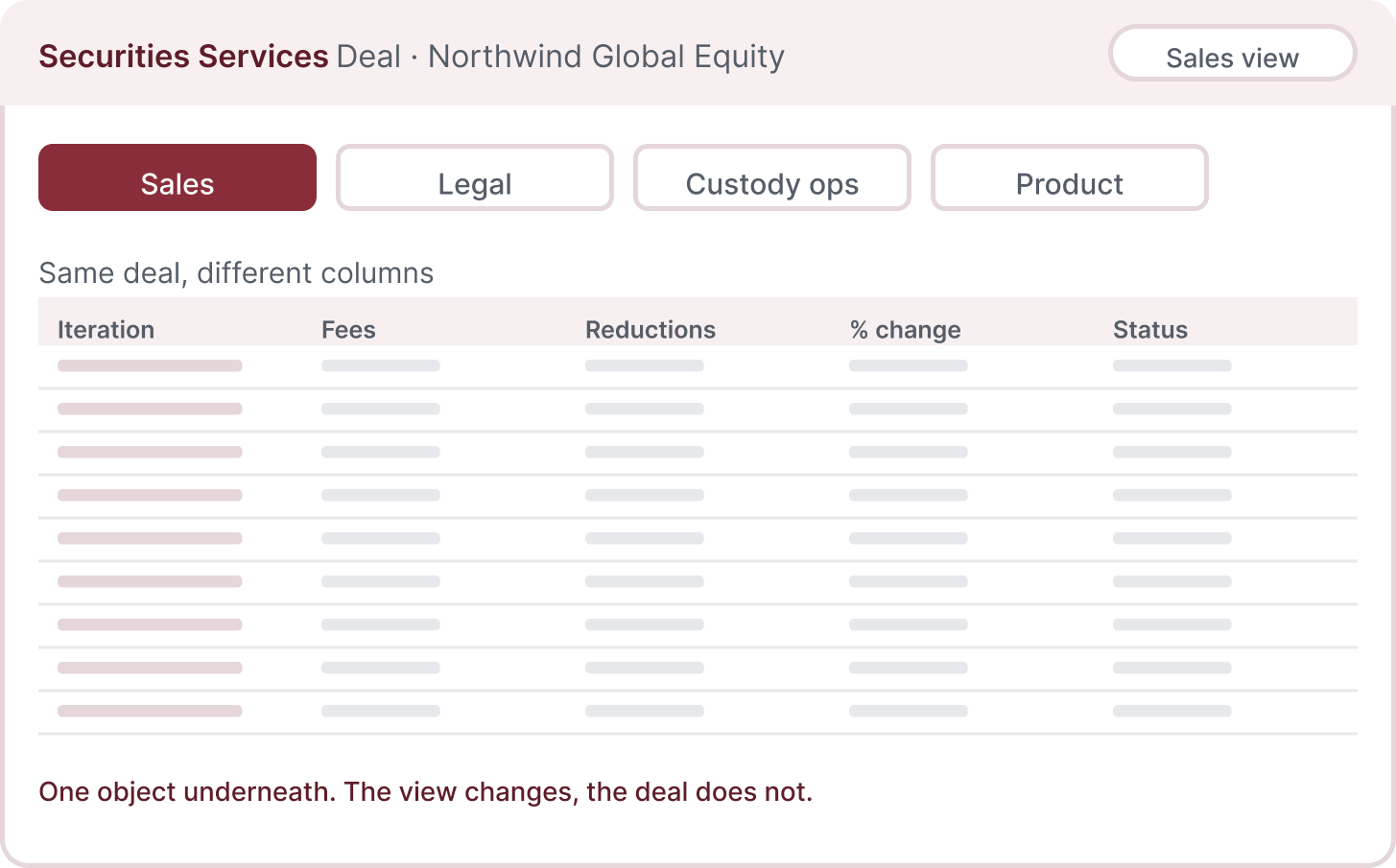
    One deal object with role-based views
    One deal object with role-based views

    Keep one deal record with views for different roles.

    Alternative

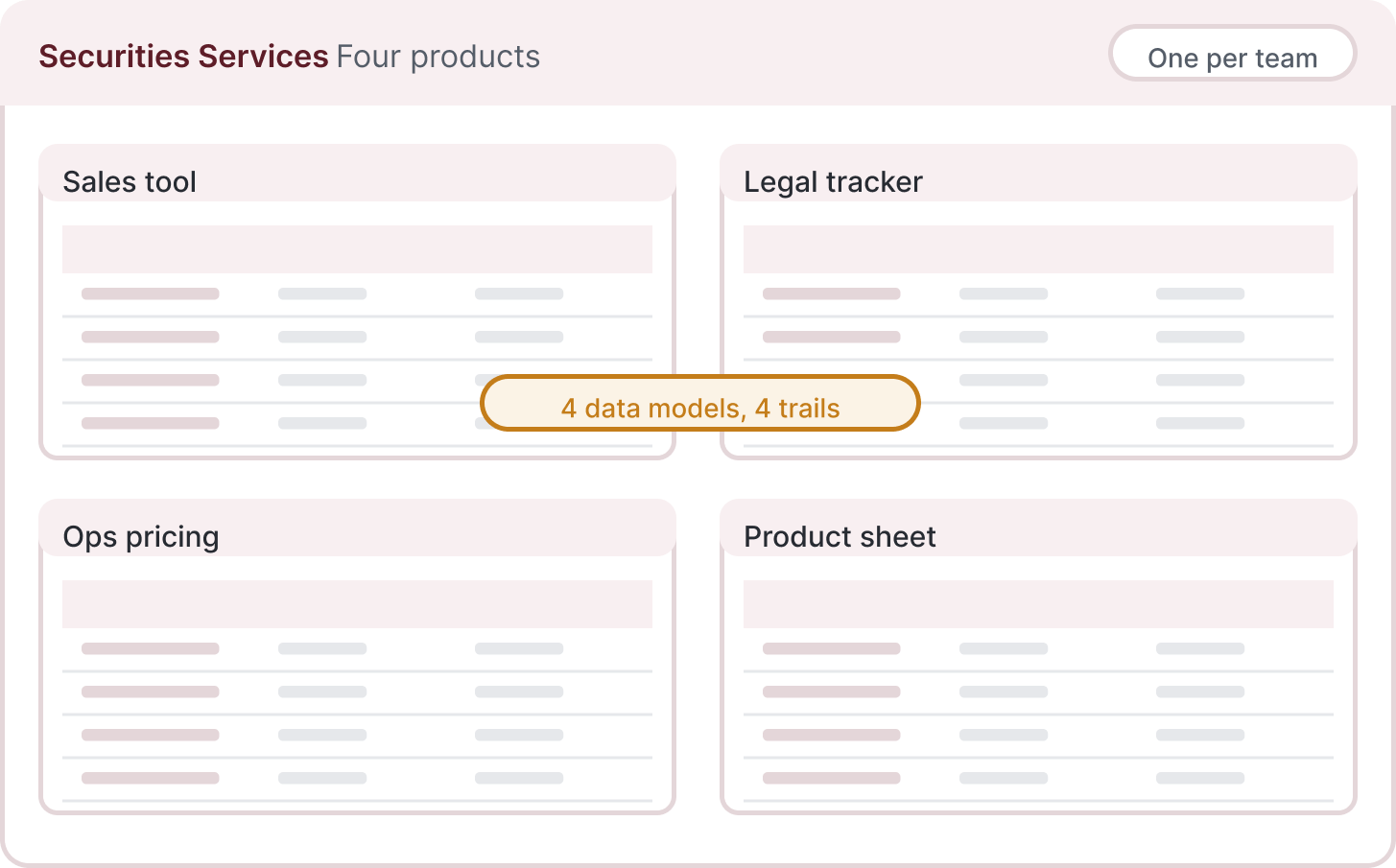
    Four products, one per team
    Four products, one per team

    Maintain a separate product and record for each team.

    Why I chose it

    We explored one product per team and one deal object with four views. Most of the arguments were about columns, not about the deal. Once each team saw its own view of the same object, the fight went away.

    What it cost

    Every change to the object needs all four teams in the review, so reviews are slower.

    What informed the decision

    I spent a year with the four teams, reviewing with each team weekly and together every fortnight. Many disagreements came down to the columns each team needed to see.

  2. Design-review method

    02Three versions, every review

    How could four teams make a useful decision in a design review?

    A single polished proposal made it hard to see which parts each team needed. Alternatives gave the discussion something concrete to compare.

    I chose

    Three versions on the table
    Three versions on the table

    Bring three different versions and combine the useful parts.

    Alternative

    One proposal, sign-off at the end

    Seek approval on one proposal at the end.

    Why I chose it

    I ran every review with three versions. People said what was wrong instead of saying yes. Sales got the comparison table, legal got the iteration list, because they asked for them in those rooms.

    What it cost

    More alternatives to prepare and explain in each review, with time needed to bring the useful parts together.

    What informed the decision

    The comparison table and iteration list came out of those reviews. I can explain how the discussions shaped them, but I did not measure the amount of rework the method saved.

  3. Designed for the internal pricing workflow

    03A compare grid with a column chooser

    What should a pricing comparison let each role see?

    Different teams needed different columns to judge the same iterations. A fixed report could not carry all those needs clearly at once.

    I chose

    Configurable compare grid
    Configurable compare grid

    Compare iterations in a grid with a saved column selection.

    Alternative

    A fixed comparison report

    Publish the same fixed comparison report for everyone.

    Why I chose it

    Sales rebuilt the comparison in Excel every time because the report never had the right columns. A grid with a column chooser, saved per user, made the comparison a view instead of a rebuild.

    What it cost

    Saved settings per user and more states to design: empty, too many columns, a column that no longer exists.

    What informed the decision

    The original designs show the compare grid and column chooser. I designed them around the different comparisons each role needed; I did not measure a separate impact for this feature.

  4. Migration support in the product

    04An upload template, not a forced migration

    How do people bring existing spreadsheet work into the deal?

    Some users stayed in the spreadsheet because it was familiar. Manual re-entry would make the platform another task instead of a route away from the old one.

    I chose

    Upload the template, system maps it
    Upload the template, system maps it

    Let the user fill an upload template that maps into the deal model.

    Alternative

    Cut everyone over on day one

    Require manual entry and a complete switch to the new flow.

    Why I chose it

    Some people kept the spreadsheet. We built an upload template they could fill in, and the system mapped it to the data model. Meet people where they are, then bring them over.

    What it cost

    Two ways in, so the mapping rules had to be maintained alongside the product.

    What informed the decision

    The template idea came from a user session, and I worked it through with the BA. Declining uploads were our adoption signal; I did not measure an adoption rate.

  5. Original designed approval workflow

    05Checks during pricing, a reason at approval

    What must the approver see with the selected pricing iteration?

    The pricing choice needs a reviewable reason and a record of the version being approved. Checks during entry and an approval decision are different responsibilities.

    Owner workflow

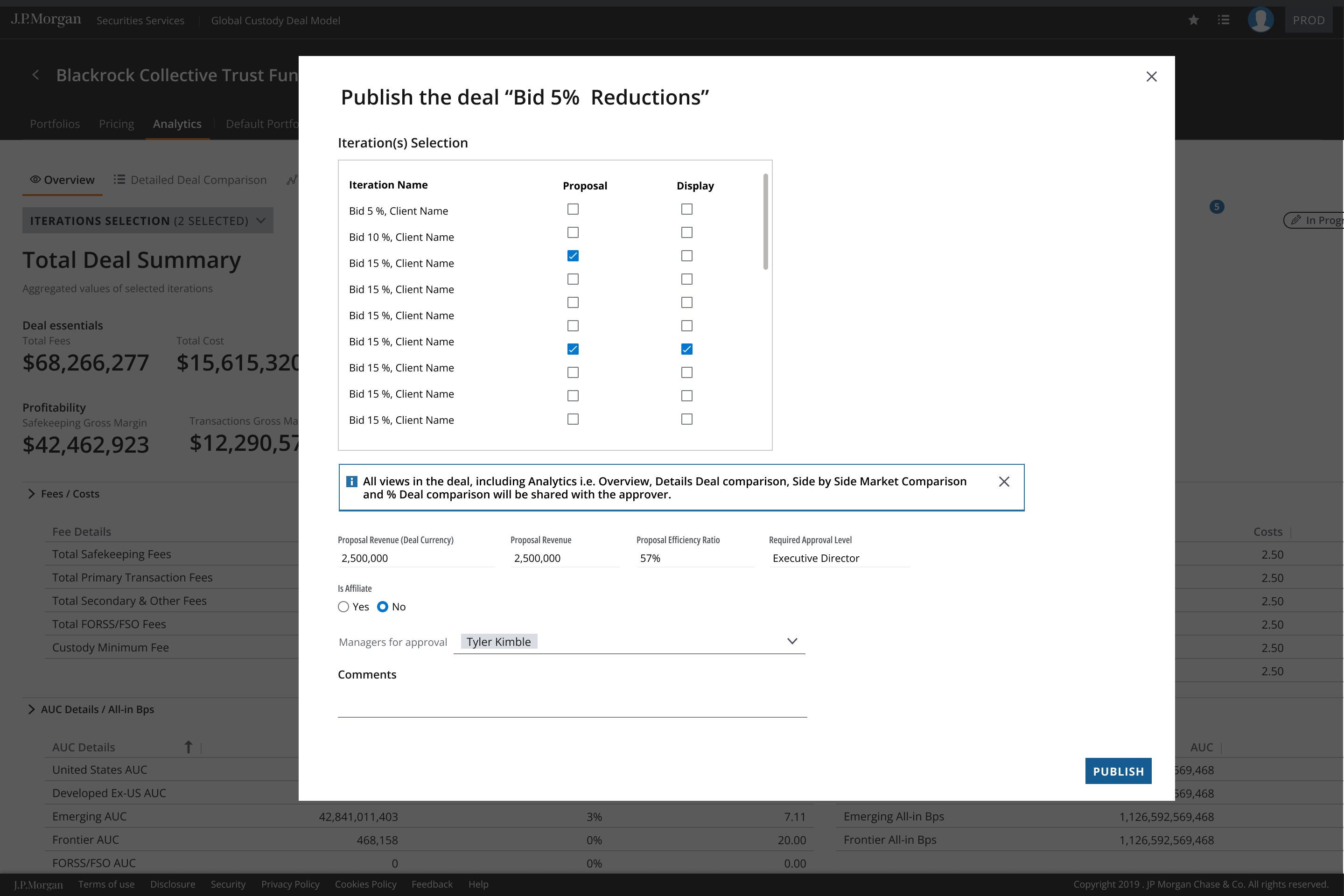
    Original Deal Model owner screen selecting an iteration and publishing the proposal for approval.
    Publish the proposal with a reason

    The owner explains the winning bid and publishes the proposal for review.

    Approver workflow

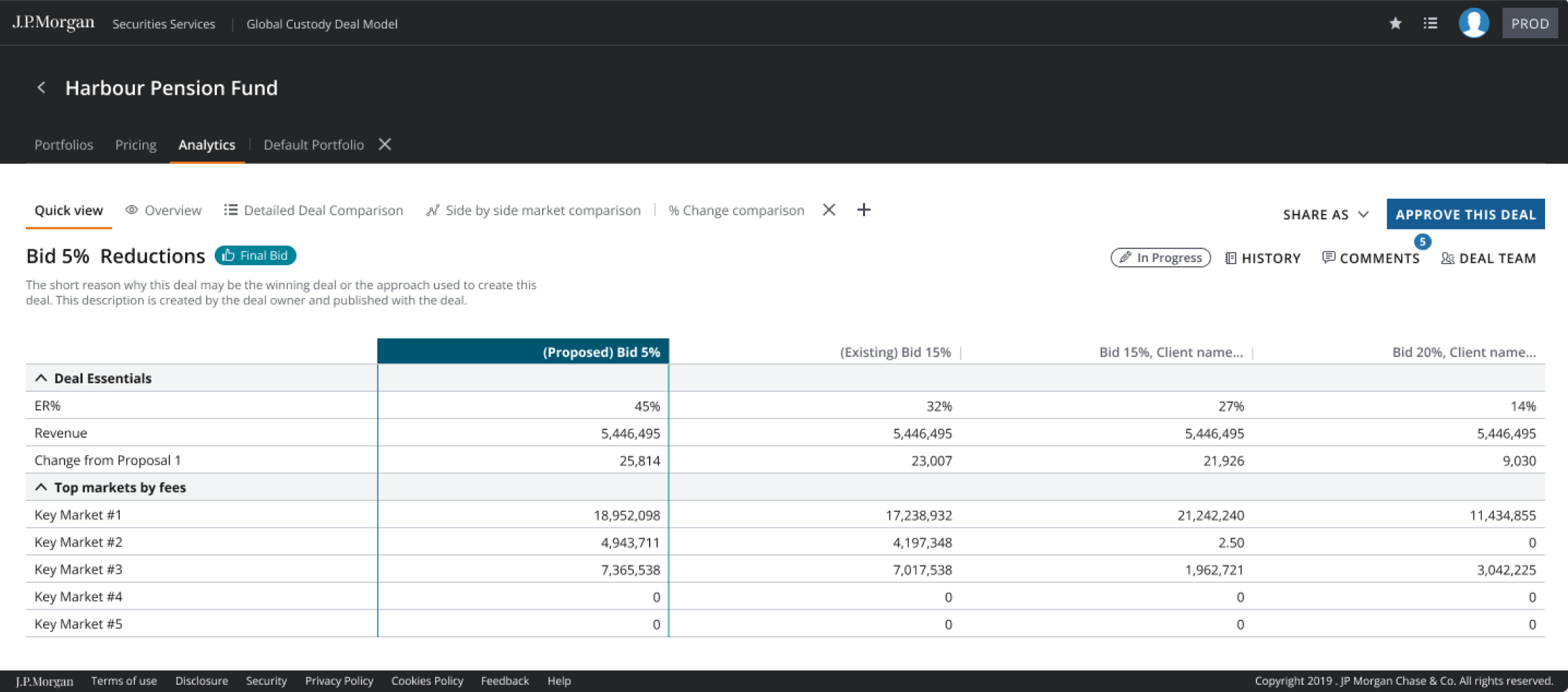
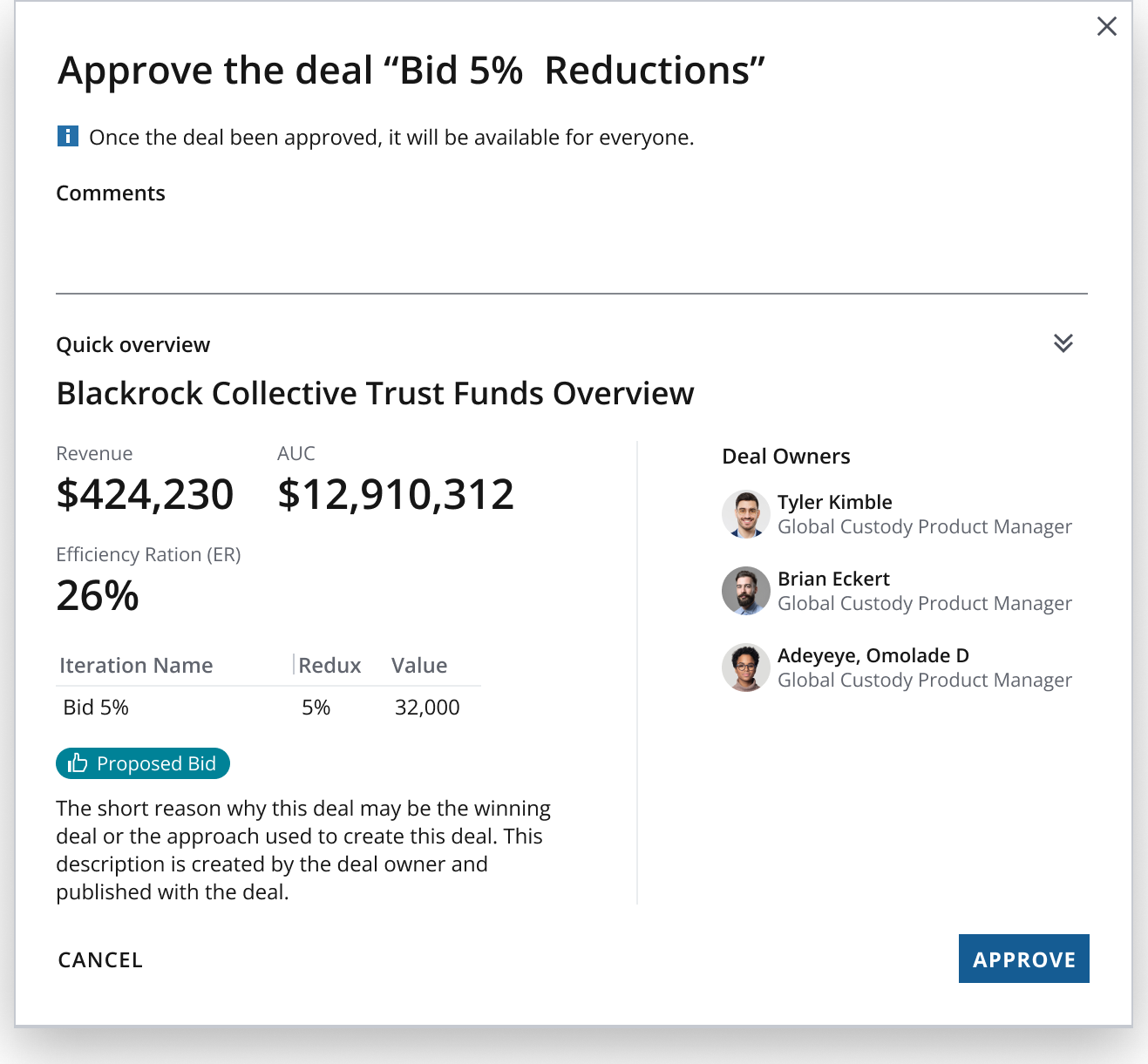
    Original Deal Model approver dialog showing comments, a quick overview, the proposed bid and the owner-written winning-bid reason.
    Review the comparison and comments

    The approver sees the proposed bid beside the existing bid, reads the owner’s reason and adds comments.

    These are the two roles in the selected approval workflow. The alternative was to keep the review in a separate email trail.

    Why I chose it

    I kept pricing checks close to the inputs and the approval record close to the chosen iteration. The owner explains the winning bid; the approver reviews the comparison and comments before deciding.

    What it cost

    The owner still has to explain the choice, and the interface must distinguish a pricing warning from the approval itself.

    What informed the decision

    The original Deal Model file shows the owner entering a short winning-bid reason, publishing, and the approver reviewing the comparison and comments before approval. It does not establish that the tool writes the owner’s narrative automatically.

  6. Explored, not built in my time

    06Smart pricing, explored

    Could past deals help an owner start the next pricing iteration?

    Starting from rate cards relies on the owner’s experience. A suggestion might give a starting point, but it would depend on reliable history and a person checking the result.

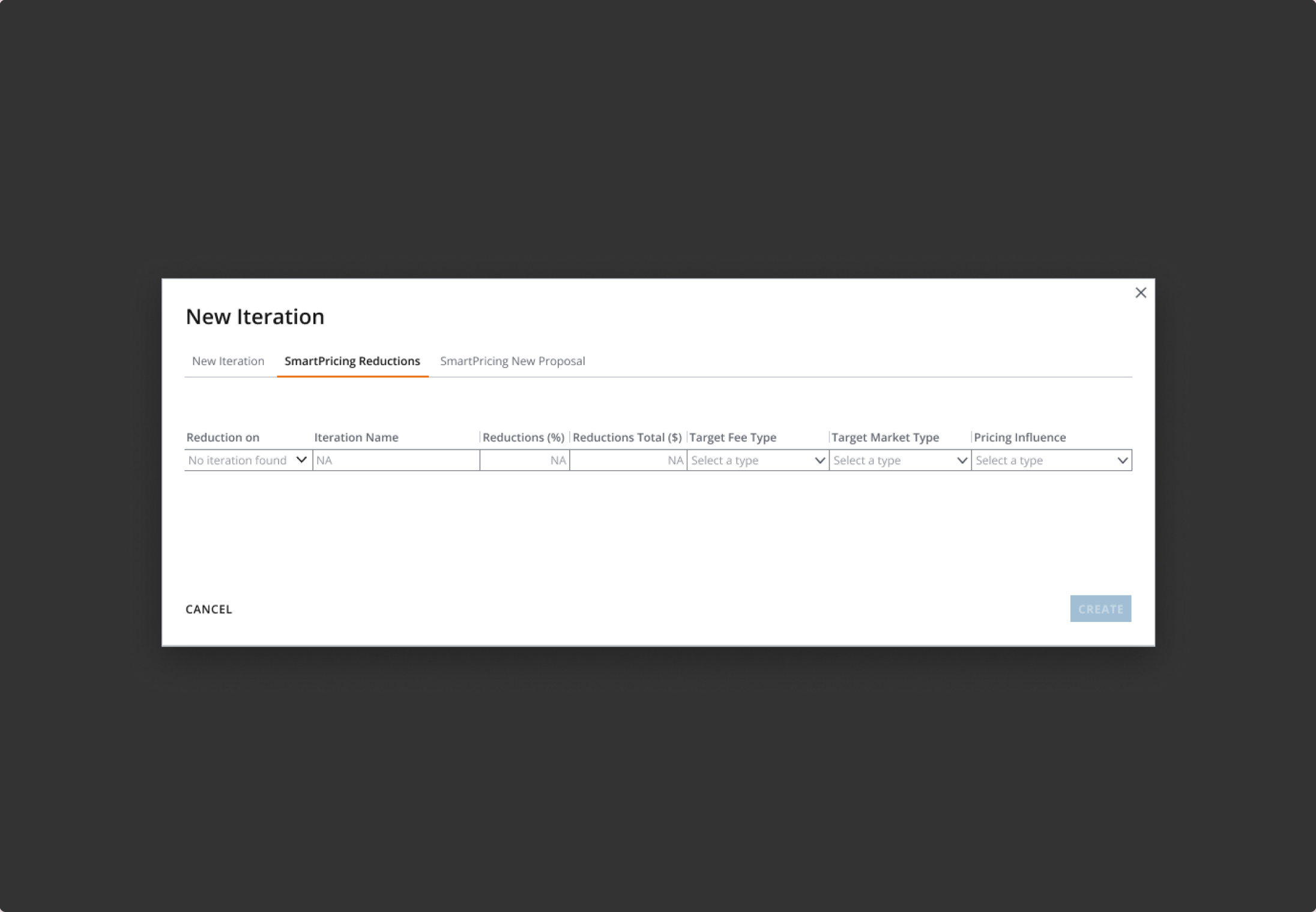
    Smart-pricing exploration

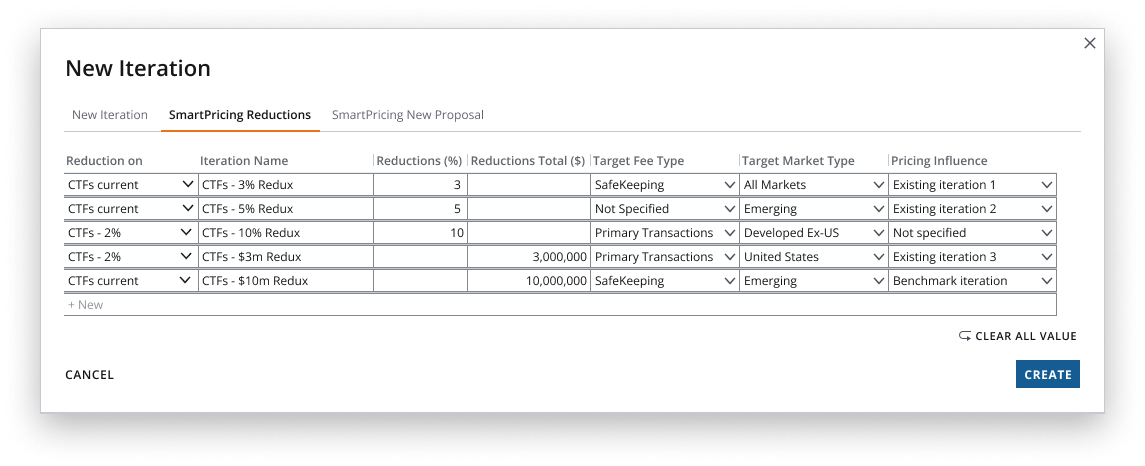
    Original SmartPricing Reductions concept: a New Iteration dialog with reduction inputs, target fee type, markets and pricing influence.
    Explore a pricing starting point

    The smart-pricing concept explores inputs for creating a new iteration. The owner remains responsible for reviewing the resulting proposal.

    New-proposal exploration

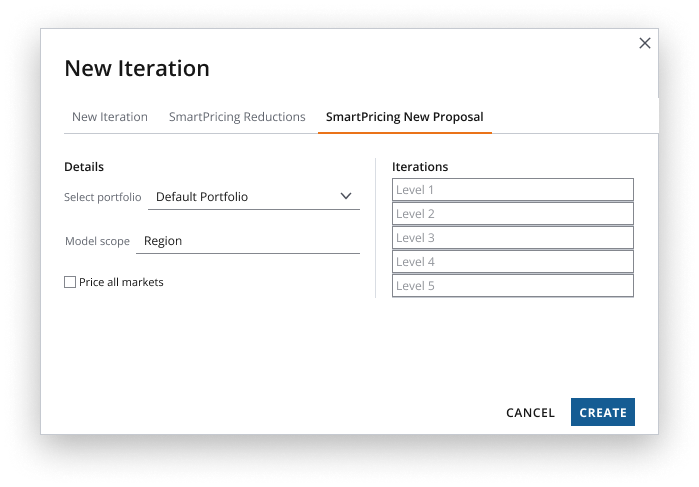
    Original SmartPricing New Proposal concept: portfolio selection, model scope, a price-all-markets checkbox and five iteration levels.
    Set up a new proposal

    The new-proposal concept collects proposal details and portfolio scope before pricing. It is another part of the exploration, not a rejected alternative.

    These are exact screens from the original exploration. Both are design concepts, not evidence of a working recommendation model. The alternative was to continue pricing from rate cards.

    Why I chose it

    At the end we explored training a model on past deals to suggest an iteration, with the deal owner editing or discarding it. Designed with the data analyst and reviewed with the four teams.

    What it cost

    It needs clean historical data, which we were still assembling. The suggestion must never auto-apply.

    What informed the decision

    I explored this with the data analyst and reviewed it with the four teams. We were still assembling the historical data. It was not built in my time.

06 Edge and validation states

Designed edge and validation states
StateWhat the screen doesWhy
Custody and transaction rates differThe new-iteration form shows a warning beside the pricing choices when the selected transaction rate differs from the custody rate.Check the mismatch while the pricing inputs are still visible.
Iteration creation succeedsA success notification confirms how many iterations were added.The owner knows the action completed.
Iteration creation failsAn error notification explains that the iteration could not be created and asks the owner to try again.Keep failure explicit rather than implying the new proposal exists.
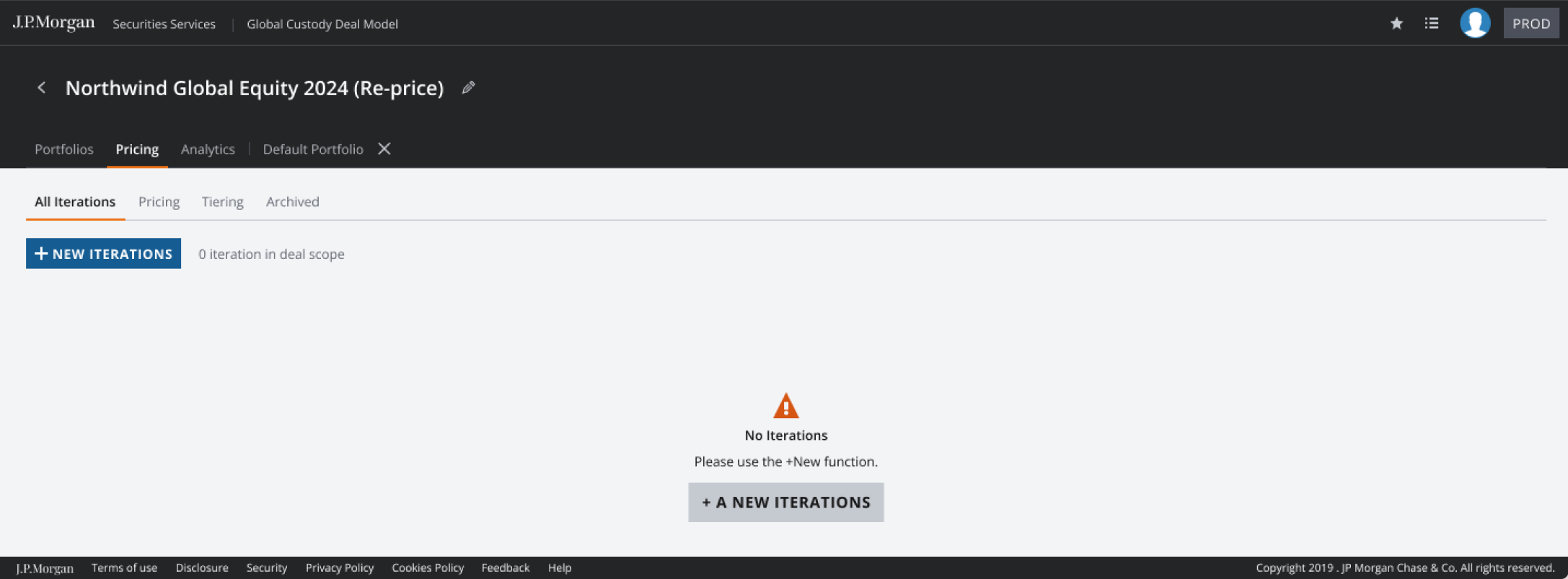
No iterations yetThe empty pricing view points to the New Iterations action, with options for a new iteration or one from benchmarks.Make the next action clear before there are proposals to compare.
Publishing and approvalThe owner publishes the proposal with a written winning-bid reason. The approver reviews the comparison and comments.Keep the reasoning beside the proposal being reviewed.
Keyboard and screen readerLandmarks, tab order, hierarchy and alternative text are documented in the ADA specification.Accessibility is part of the design review.
A wide pricing gridThe pricing area includes a column chooser, comparison grid and separate tiering view.Give each pricing task the controls and context it needs.

Feedback at the point of action

A text summary of the original Pricing designs: an empty list, a rate-source warning, and success or failure when creating iterations.

Empty

Pricing iterations

No iterations

Start a new iteration or use a benchmark.

Warning

Pricing sources

Different custody and transaction rates

Check the selected rate cards before adding the iteration.

Success

Create iterations

2 iterations added

Confirmation appears after the action completes.

Error

Create iteration

Could not create iteration

Please try again.

07 Outcome and impact

  • Design scope

    Before I moved to Fusion in 2023, I worked across six design phases covering deals, portfolio, pricing, tiering, ADA specs, the deal-owner dashboard and the approver workflow. Smart pricing was explored with the data analyst but was not built in my time. I reviewed the work with the four teams at each phase.

  • Live

    In use internally in Securities Services. It is an internal product, so there is no public link and no production screen on this page.

  • Adoption

    Four teams moved onto one platform. The upload template was the bridge. It kept the habit while people learned the platform, and when template uploads dropped to nothing we knew they'd moved. That is the signal I have. No adoption number was measured in my time, so none is claimed.

  • My estimate

    Creating a deal went from about two hours across tools to about twenty minutes in one flow, and the audit trail now comes out of the tool. That is my estimate from a year with the teams, not a measured study.

  • What I would measure

    Time to create a deal, iterations per deal, approvals returned for correction, and how many deals still start in the spreadsheet.

  • What I would do differently

    Measure before and after. I had the teams for a year and never timed the old flow properly. And bring the data analyst in from phase one, so smart pricing had its data ready when we designed it.